Data
The data class is responsible for loading (e.g., images or texts), and processing (e.g., data augmentation) of samples. A sample is a single instance of data that is processed in the network.
A preprocessing pipeline handles the data that are fed into the Model by applying a list of DataProcessors and eventually setting up a tf.data.dataset.
Furthermore, a postprocessing pipeline can be added to process the data (e.g. pruning) that is produced by the network.
Figure 1 shows an overview of the pre-processing pipeline provided by tfaip.
The actual pipeline (lower half, purple) is created by a list of DataProcessorParams (upper half, orange).
The input of the pipeline (DataGeneratorParams, golden) is can depend on the steps training, LAV, or prediction.
Usually, this is ListsFileDataGeneratorParams which will simply generate filenames parsed from text file (see Scenario<doc.scenario:ListFileScenario> for setting up a ListFileScenario).
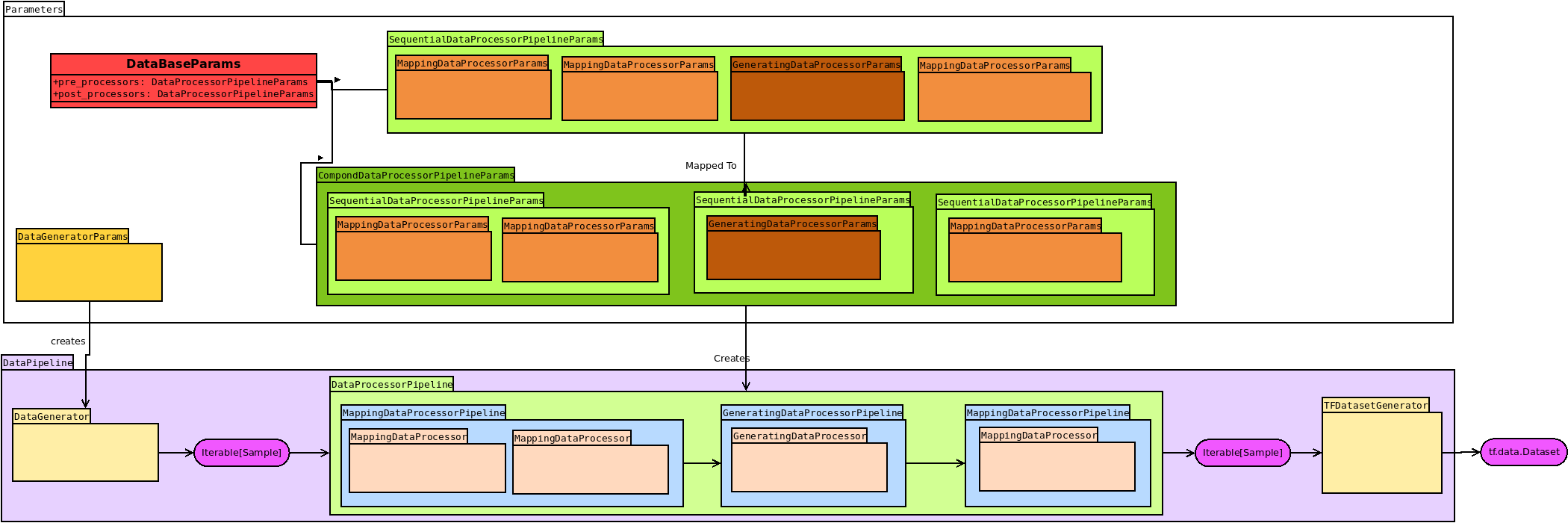
Figure 1: The data processing pipeline
Implementation
A data class has to extend from tfaip.data.data import DataBase and implement the following
class Data(DataBase[DataBaseParams]):
    @abstractmethod
    def _input_layer_specs(self) -> Dict[str, tf.TensorSpec]:
        raise NotImplementedError

    @abstractmethod
    def _target_layer_specs(self) -> Dict[str, tf.TensorSpec]:
        raise NotImplementedError

    @classmethod
    def default_params(cls):
        # can optionally be overwritten
        p = super().default_params()
        p.pre_proc.processors = [
            # Optionally pass a list of DataProcessorParams to define the input pipeline (see orange boxes in Figure 1)
        ]
        return p
You can optionally extend DataBaseParams (recommended: do this in a separate python file) to add more parameters.
Required Overrides
The only two required methods to overwrite return dicts mapping from node names to tf.TensorSpec, e.g.,
def _input_layer_specs(self) -> Dict[str, tf.TensorSpec]:
    # Shape and type of the input data for the graph
    return {'img': tf.TensorSpec(shape=[28, 28], dtype='float32')}

def _target_layer_specs(self) -> Dict[str, tf.TensorSpec]:
    # Shape and type of the input data for the graph
    return {'tgt': tf.TensorSpec(shape=[1], dtype='int32')}
for a fixed 28x28 input image, and a class label as target. The batch dimension must be omitted as batching is performed automatically.
Important: No scalars are allowed. Allowed shapes [1] for a scalar, [N] for vector, [H,W,C] for a tensor, …
Optional Overrides
By default, all arrays are automatically padded with zeros, overwrite _padding_values to provide different values.
def _padding_values(self) -> Dict[str, AnyNumpy]:
   return {'img': 255}
Pre/Post-Processing Pipelines
DataProcessors enable to modify data by consuming and producing a list of Sample.
There are two types of data processors:
A
MappingDataProcessoris similar to the default mapping function of Python and produces one output sample for each input sample (a1to1mapping).A
GeneratingDataProcessoris similar to a generator in Python:Nsamples are consumed butMsamples are produces, wherebyM<NandM>Nare equally legitimated.
DataProcessors are defined and constructed by their corresponding DataProcessorParams.
DataProcessor Definition
The following shows a simple DataProcessor that will load an image and its GT from the drive based on filenames.
Optionally, add parameters (e.g., the color mode in this case) to the processor params.
@pai_dataclass
@dataclass
class LoadSampleProcessorParams(DataProcessorParams):
    def cls(self):
        return LoadSampleProcessor

class LoadSampleProcessor(MappingDataProcessor):
    def apply(self, sample):
        return (
            sample.
                new_inputs(load_image(sample.inputs)).   # Change the inputs
                new_targets(load_gt(sample.targets))     # Change the targets
        )
Set Up
Override the default_params of the Data-class to set up the default preprocessing pipeline:
@classmethod
def default_params(cls) -> ListFileDataParams:
    # setup default processing pipeline
    params = super().default_params()
    params.pre_proc = SequentialDataProcessorPipeline(
        run_parallel=True,  # Set to True if this pipeline shall run in parallel
        processors=[
            LoadSampleProcessorParams(),  # Load the sample and its GT
            AugmentProcessorParams(modes={PipelineMode.Training}),  # Apply data augmentation, but only during training
            FinalizeProcessorParams(),  # Finalize the sample, i.e., bring it in the correct form matchin the input and target layer specs
        ],
    )
    return params
Modes of DataProcessor
As shown in the previous code, the DataProcessorParams provide a field when to apply this processor.
Here, the AugmentProcessorParams (i.e., data augmentation) shall only be applied on the training pipeline.
Resources
Quite often your model requires resources for training but also for the later application.
A typical resource is a file that needs to be served when exporting the model.
The dataclass automatically handles the export of Resources via its ResourceManager by copying the resources to the export dirs and automatically adapting the search path of the resource.
Define a Resource in your parameters:
@pai_dataclass
@dataclass
class DataParams(DataBaseParams):
    charmap: Resource = field(default=None,
                              metadata={**pai_meta(help="File specifying the character map used", required=True),
                                        **config(encoder=Resource.encode, decoder=Resource.decode)}
                              )
In this example, the character map will automatically be copied to the resources dir in the exported model.
Development
This section provides additional information about the actual implementation of the data pipeline in tfaip. Read this if you are interested in understanding or extending tfaip.
The following image provides an overview of all relevant classes
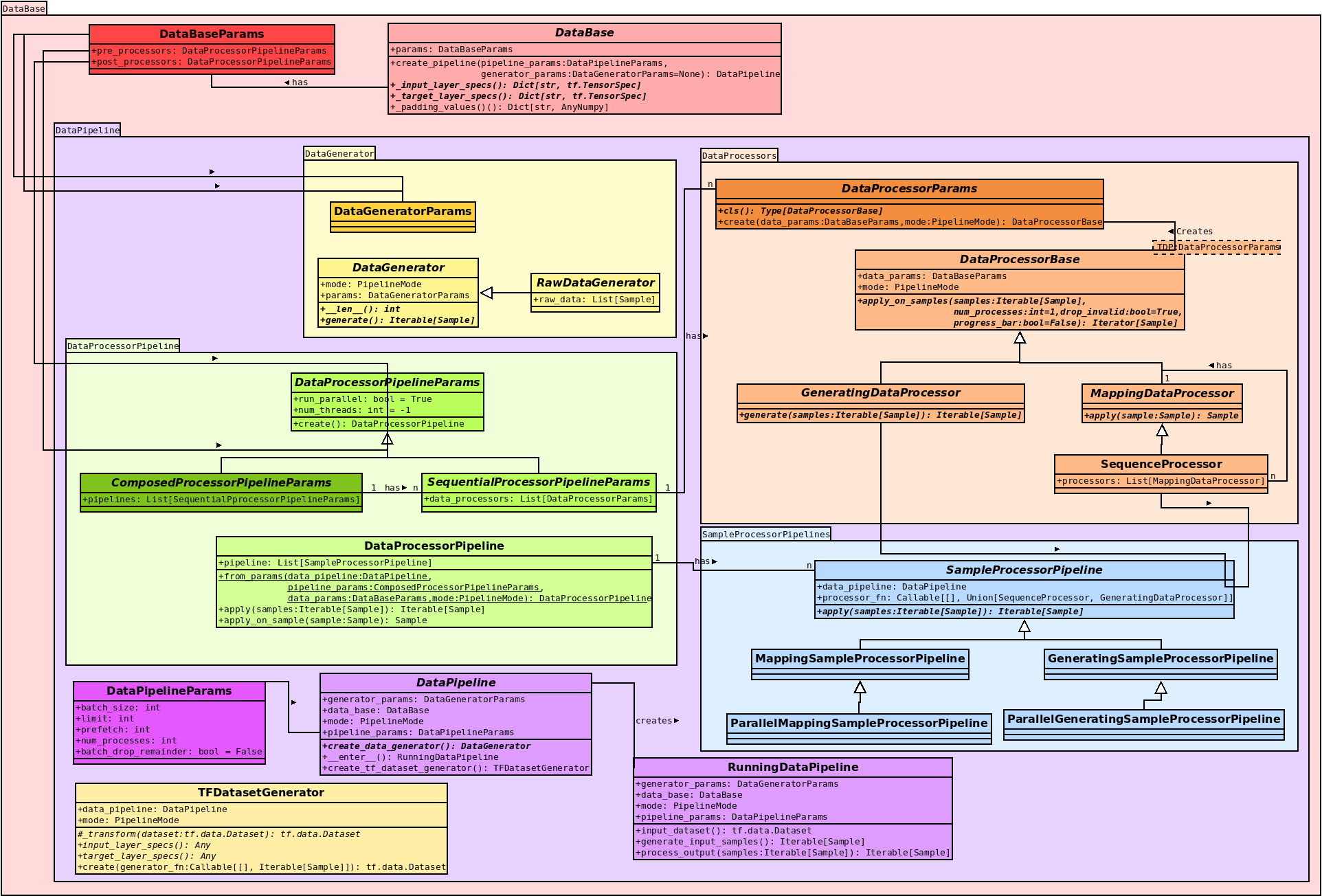
Figure 2: Overview of all classes withing the data module
Have a look at the code documentation for a description of the individual classes, in the following is only a small overview:
Red:
DataBaseParamsandDataBasedefine the overall structure of a data pipeline by connectingDataProcessorParams. By callingget_or_create_pipeline, orcreate_pipelineaDataPipelinewill be prepared.Purple: Entering this pipeline
with DataPipeline as RunningDataPipelineaRunningDataPipelinewill be created which will spawn threads if required and join them when exiting thewithblock.Yellow: The
DataGeneratorprovide the data for the preprocessing pipeline. The actual implementation depends on the scenario and mode (e.g. different data sources for training, lav and prediction)Orange: The creation and definition of the different
DataProcessortypes. A user should only overrideMappingDataProcessorandGeneratingDataProcessor. MultipleMappingDataProcessorswill be joined to aSequenceProcessorfor faster execution (send as a complete block to a spawned process upon parallelization).Green: Setting up of the actual Pipeline using parameters. By default, a
SequenceProcessorPipelineParamsshould suffice, if however GeneratingDataProcessors play a role it might be sensible to provide a custom grouping which can be done viaCompoundProcessorPipelineParamsNote, theSequenceProcessorPipelineParamswill be converted automatically to aCompoundProcessorPipelineParams(see Figure 1).Blue: These classes are use for the actual data processing of a set of
MappingDataProcessorsin aMappingSampleProcessorPipelineor oneGeneratingDataProcessorin aGeneratingSampleProcessorPipeline. Each class has a corresponding parallel version (see lower half of Figure 1). Construction of the actual processors (callingDataProcessorParams.create) is performed within these classes to ensure that only the parameters are passed to a spawned process not the actual class (which might not be serializable via pickle).Yellow (lower left): The
TFDatasetGeneratorcan optionally be overwritten in a DataPipeline to change the creation of thetf.data.Datasetor to inject additional data mappings performed in Tensorflow.